 Shoopy
 Ecommerce platforms in India with built-in WhatsApp abandoned cart recovery (2026)
Four ecommerce platforms compared on WhatsApp cart recovery: who sends the reminder and from whose number, which needs an added app, and WhatsApp's rules.
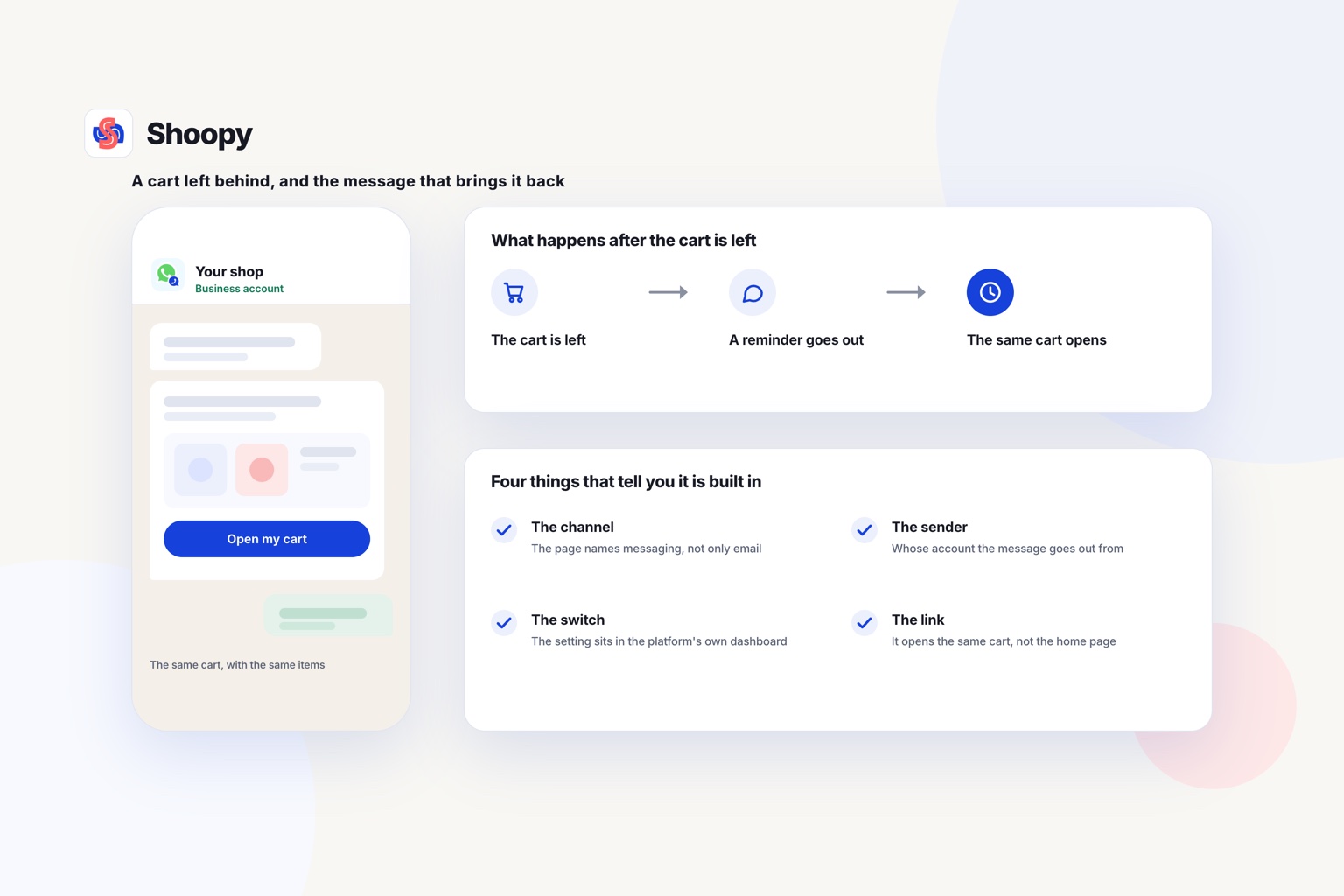
Quick Answer: Shoopy is one ecommerce platform with WhatsApp abandoned cart recovery built into the store, and this guide compares it with Dukaan, Shopify and WooCommerce. Built in means the platform itself sends the reminder, with a link back to the cart, and no separate app. The table shows what each platform’s own page says.
WhatsApp abandoned cart recovery is a WhatsApp message sent to a shopper who left items in the cart without paying. The message carries a link back to that cart, so the shopper can finish the order in one tap.
How do Dukaan, Shopify, WooCommerce and Shoopy send cart reminders?
The table lists four platforms in no order of rank. It shows what each platform’s own page says: WhatsApp named for cart reminders, or email named instead. Each rival row is read from that platform’s own page and dated.
| Platform | What the platform’s own page says about cart reminders |
|---|---|
| Dukaan | As of October 2026, Dukaan’s pricing page lists automated abandoned cart recovery, with recovery messages sent from Dukaan’s own WhatsApp or email account |
| Shopify | As of October 2026, Shopify’s help centre page on abandoned checkouts, which covers its legacy abandoned checkout setup, describes automatic emails with a link back to the cart. It names the Online Store and Buy Button sales channels, and email, not WhatsApp |
| WooCommerce | As of October 2026, WooCommerce’s AutomateWoo guide describes abandoned cart emails sent by the AutomateWoo extension, which marks a cart abandoned after 15 minutes of inactivity by default |
| Shoopy | A cart left behind gets a WhatsApp reminder with a link back to checkout. You switch it on once, and you send nothing by hand. Plans and current prices are on the pricing page |
Does each platform remind by email or by WhatsApp?
Read the channel first. A reminder by email and a reminder by WhatsApp reach the shopper in different places.
Then read who sends the message. A message can come from the platform’s shared account or from your own business number. The shopper sees a different sender name in each case.
Dukaan: read the sender line in its row before you decide.
Shopify and WooCommerce: read which channel each page names, and check whether a WhatsApp reminder needs a separate app.
How can you tell if a platform’s cart reminder is built in?
Open the platform’s own help or pricing page, not a review site. Then check four things on that page.
- The channel. The page should name WhatsApp, not only email or SMS (text message).
- The sender. The page should say whose WhatsApp account sends the message.
- The switch. The setting should sit in the platform’s own dashboard. If the page sends you to an app marketplace first, the reminder is added, not built in.
- The link. The reminder should open the same cart, with the same items, on the shopper’s phone.
Then test it yourself. Add a product to the cart on your own store, enter your phone number at checkout, and leave. Wait for the message, tap the link, and check that the cart opens with the same items.
Date what you read. Platforms change their features and their pages, so note the day you checked each one.
Built in or added by an app: what changes for you?
A built-in reminder is one setting inside the platform. An added app is a second product, with its own settings, its own bill and its own support desk.
What stays simple when cart reminders are built in?
The reminder works from the same catalogue and order list as your store. There is no second copy of your products to keep up to date. Ask whether the reminder is skipped once the shopper has paid.
You also have one place to look when something breaks. You check the setting, the phone number and the order, in the same dashboard.
When does an added app make sense?
An app can make sense when you already run a store on a platform that has no WhatsApp reminder. Moving the whole store to get one feature is a large job. Adding one app is a small one.
Before you add an app, ask three questions:
- What does it charge, and does that charge grow with your messages?
- Which shopper details does it copy from your store?
- How do you remove it, and what happens to those details then?
What do WhatsApp’s own rules mean for cart reminders?
WhatsApp lets a business message a shopper only with permission, and only through approved templates outside a reply window. These rules apply whichever platform you use.
WhatsApp’s Business Messaging Policy sets four rules that matter here.
- Permission first. A business may message a person only if that person gave their number and opted in to receive messages.
- Templates outside the window. You may reply freely for 24 hours after the shopper’s last message. Outside that window, you may send only a message template (a pre-written message) that WhatsApp has approved.
- Opt-outs count everywhere. You must respect every request to stop messages, whether the shopper asks on WhatsApp or anywhere else.
- Blocks have a cost. Shoppers can block or report a business, and WhatsApp may then limit how many messages that business can send.
The same policy says WhatsApp prices business messages under its own pricing policy. So ask any platform who pays that charge for each reminder.
If the shopper has not messaged you in the last 24 hours, no reply window is open. The reminder then has to be an approved template.
What goes wrong with WhatsApp cart reminders, and how do you avoid these mistakes?
Four things go wrong: no permission, a wrong number, too many reminders and a broken link. Each one has a simple fix.
No permission
A shopper who never agreed to WhatsApp messages may report you. Add a clear line at checkout, such as “Send me order messages on WhatsApp”, and record the answer.
A wrong number
The reminder goes to the number the shopper typed at checkout. If that number has a typing error, the message never arrives. Ask for the number with its country code, and show it back to the shopper before payment.
Too many reminders
One reminder is a service. Several reminders for one cart start to feel like pressure, and pressure leads to blocks. A block also stops every later message to that shopper, including messages about a real order.
A broken link
A reminder that opens an empty cart wastes the shopper’s tap. Test the link after every change to your checkout or your catalogue. Check that a product that is out of stock does not appear in the restored cart.
If most of your orders already start in a WhatsApp chat, this guide to taking WhatsApp orders without the chaos shows how to move each order into one list.
Which cart reminder setup fits your store?
Match the platform to the store you run today and the channel your shoppers answer. This list follows the type of seller, not a ranking.
- You already run a store on Shopify or WooCommerce. Keep the store, and read its row in the table. If its page names no WhatsApp reminder, adding one app is a smaller job than moving the whole store.
- You are choosing a platform now, and your shoppers reply on WhatsApp. Shortlist platforms whose own page names WhatsApp for cart reminders. Then test each one with a real cart, as described above.
- You sell from a shop and online. Shoopy runs an online store on your own domain, with one catalogue for the counter and the store. The marketing page shows how its WhatsApp cart reminder works, and you can book a demo there.
Here is one limit to know. Shoopy’s automatic cart reminders run only through the WhatsApp connection that its help article on cart reminders describes. If you want a different WhatsApp tool to send your reminders, that tool will not drive them.
Frequently asked questions
What is abandoned cart recovery?
Abandoned cart recovery is the follow-up a store sends after a shopper adds items to the cart and leaves without paying. The message reminds the shopper about the cart and links back to it. Stores send it by email, SMS or WhatsApp. The goal is to turn an unfinished visit into a completed order.
What should a WhatsApp abandoned cart message say?
Keep it to two or three short lines. Use the shopper’s first name, name the item left in the cart, and add one link back to checkout. Write it in the language your shoppers use. On WhatsApp, a message sent outside the 24-hour reply window must use an approved template.
How do I work out my abandoned cart recovery rate?
Divide the orders completed from reminders by the carts that received a reminder, then multiply by 100. For example, 12 orders from 200 reminded carts gives a rate of 6%. Count only carts that had a phone number, because a WhatsApp or SMS reminder cannot reach a cart without one.
Should cart reminders go by WhatsApp or by email?
Send them where your shoppers read messages. A WhatsApp reminder needs a phone number and the shopper’s permission to message it. An email reminder needs an email address, and an SMS reminder needs the phone number. You can ask for both at checkout. Then test each channel and compare the orders each one brings back.
What should you do about carts with no phone number?
Treat them as a separate problem. A WhatsApp reminder needs a number, so a cart without one cannot be reached that way at all. Look at where in checkout the number is asked for, and whether it is optional. Moving it earlier usually recovers more carts than any change to the reminder itself.